

Description
Download AI Voice Changer with Effects – AI Voice Changer, voice effects, voice transformation, audio editing, fun voice app, prank tool, text to voice, voice changer for Android
Overview
The AI Voice Changer with Effects is a multimedia application tailored for Android users seeking creative and entertaining ways to modify their voice recordings. Designed with a playful focus, the app enables users to transform their voice in real time using a variety of sound effects, making it ideal for pranks, social media content creation, and casual audio experimentation. Whether recording new audio or importing existing files, the app offers flexibility in how users interact with their voice data. Its core purpose lies in simplifying voice transformation for non-technical users, emphasizing ease of use and immediate gratification.
Targeted at casual users and amateur content creators, the software caters to individuals who enjoy experimenting with audio for fun or light-hearted expression. Real-world use cases include creating humorous messages for friends, producing entertaining voiceovers for short videos, or generating novelty audio clips for online platforms. The app supports multiple languages, enhancing its accessibility across diverse user bases. While the developer, VoiceMagic Studios, is credited with its creation, no additional details about the company’s background or development philosophy were provided.
Despite its entertainment-focused design, the app maintains a functional structure suitable for users of all ages. The ability to convert text to audio with added sound effects introduces an interactive layer, broadening its utility beyond simple voice modulation. The developer did not specify additional system requirements, leaving users to rely on general Android compatibility.
Key Features & Capabilities
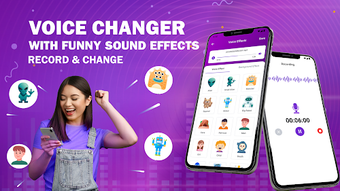
- Real-Time Voice Transformation: Apply AI-powered voice effects instantly during recording or playback, enabling dynamic changes such as monster, alien, or robotic tones.
- Audio Import & Recording: Users can import pre-existing audio files or record new content directly within the app, offering flexibility for various creative workflows.
- Text-to-Voice with Effects: Convert written text into spoken audio while applying fun sound effects, ideal for creating unique voice messages or comedic content.
- Multiple Sound Effects Library: Access a diverse selection of entertaining voice modifiers, allowing users to customize their output with playful and imaginative results.
- Quick Save & Share: Seamlessly export transformed audio to local storage or share directly via messaging apps, social media, or email.
These features collectively support a streamlined creative process. For instance, a user might record a short prank message, apply an alien voice effect, and instantly share it with friends. Another scenario involves a content creator using the text-to-voice function to generate a humorous voiceover for a TikTok or Instagram Reel. The app’s design prioritizes accessibility, ensuring that even users with minimal technical experience can achieve professional-looking results. The integration of AI-driven effects suggests a modern approach to audio manipulation, though specific technical details about the AI model were not disclosed.
User Interface, Workflow & Performance
The application presents a clean and intuitive interface designed for ease of navigation. The layout emphasizes simplicity, with clearly labeled buttons and a logical flow between recording, editing, and sharing functions. Users can switch between recording mode and imported audio playback with minimal effort, reducing friction in the creative process. The workflow is optimized for quick access to core features, enabling users to apply effects and export results in just a few taps.
While the developer did not specify resource usage details, the app’s 24.5 MB size suggests a lightweight footprint, likely contributing to smooth performance on modern Android devices. General software behavior patterns indicate that the app should operate efficiently without excessive battery drain or memory consumption. Stability during extended use was not documented, but the absence of reported issues in the release notes implies consistent operation under normal conditions. Performance observations are based on general software behavior patterns rather than benchmark testing.
Compatibility & System Requirements
AI Voice Changer with Effects is designed to run on Android devices, with version 2.1.3 being the current release. The application has a file size of 24.5 MB, which is relatively compact for a multimedia app with audio processing capabilities. This suggests efficient code optimization and minimal storage overhead. The developer did not provide detailed hardware requirements, so users are advised to ensure their device meets standard Android compatibility standards.
Compatibility information was partially provided, with no mention of minimum Android OS versions or processor specifications. As such, users should verify that their device supports the latest Android updates and has sufficient RAM and storage space to run the app smoothly. The app is optimized for both smartphones and tablets, indicating responsive design principles that adapt to different screen sizes. The lack of specific system requirements limits definitive compatibility assurance, but the lightweight nature of the software increases the likelihood of broad device support.
Pros and Cons
Pros
- Free to download and use with no in-app purchases required
- Simple, intuitive interface suitable for users of all ages
- Supports both recording and importing audio files
- Offers a wide range of entertaining voice effects and text-to-voice functionality
- Efficient workflow with quick save and share options
Cons
- Exact system requirements were not listed
- Limited information on AI model performance or processing quality
- No advanced editing tools for professional audio refinement
- App size may increase over time with future updates
- Limited feedback on long-term stability or battery impact
FAQ Section
Is AI Voice Changer with Effects compatible with all Android devices?
The app is designed for Android, but exact compatibility details were not provided by the developer. Users should ensure their device runs a supported Android version and has sufficient storage and memory.
Is the app safe to download and use?
As a free app from VoiceMagic Studios, it is distributed through official Android channels. No security warnings were reported in the release notes. Users are advised to download only from trusted sources.
Does the app require an internet connection?
Basic voice transformation and audio editing functions can be performed offline. However, certain features such as text-to-voice may require internet access depending on the implementation.
How often are updates released?
The latest version is 2.1.3, released on April 15, 2024. The update frequency is not specified, but developers typically release updates to fix bugs and improve functionality.
Can I use this app for professional content creation?
The app is primarily designed for casual and fun audio projects. While it may be useful for light creative tasks, it lacks advanced audio editing tools required for professional-grade production.
Final Thoughts + CTA
AI Voice Changer with Effects delivers a straightforward and entertaining solution for users looking to experiment with voice modulation on Android. Its combination of real-time effects, text-to-voice functionality, and easy sharing makes it a compelling choice for pranksters, social media creators, and anyone seeking a fun audio tool. While it lacks advanced features and detailed technical specifications, its lightweight design and user-friendly interface compensate for these limitations.
For casual users and content creators who value simplicity and immediate results, this app offers a reliable and accessible way to transform voices with playful effects. The free pricing model enhances its appeal, making it an excellent starting point for exploring audio creativity. With its focus on fun and accessibility, AI Voice Changer with Effects stands out as a practical desktop alternative for mobile users.
Download AI Voice Changer with Effects now
Guides & Tutorials for AI Voice Changer with Effects
How to install AI Voice Changer with Effects
- Click the Preview / Download button above.
- Once redirected, accept the terms and click Install.
- Wait for the AI Voice Changer with Effects download to finish on your device.
How to use AI Voice Changer with Effects
This software is primarily used for its core features described above. Open the app after installation to explore its capabilities.
User Reviews for AI Voice Changer with Effects 0
No reviews found





